SigmaTurn — One Platform, Every Business Operation
Finance, CRM, inventory, HR, GPS workforce tracking, and more — unified in one AI-powered platform. Replace a dozen disconnected tools with a single data model, live cross-module dashboards, and AI insights that flag issues before you have to ask.
SigmaTurn OS
One login · every department
Modules live
35+
Data model
1 unified
Setup
7-day trial
New · Product Launch
Meet SigmaTurn.
The AI-powered operating system for your entire business — every department, one intelligence layer.
01 login·All modules·1 AI layer running underneath all of it
See SigmaTurn run a whole business in 4 minutes
Separate tools for accounting, CRM, HR, and payroll mean separate logins, separate bills, and data that never connects. This walkthrough shows how SigmaTurn replaces them with one AI-powered platform — enter data once and every module updates.
Every department, organized into one system.
Eight module categories cover the full run of a business — jump to any one for the full breakdown below.
One system. Eight jobs done properly.
A quick grid is enough to skim — it's not enough to decide. Here's what actually happens inside each of SigmaTurn's eight module categories, how the pieces connect, and what changes for your team once they're switched on.
AI Marketing
Most teams run marketing out of whatever tool was free at the time — a scheduler for social, a separate sender for email, a spreadsheet for the campaign calendar, and no real link back to who actually bought anything. SigmaTurn's AI Marketing module sits inside the same data model as your CRM and sales pipeline instead, so every campaign is built against real client and lead records rather than a guessed-at export.
Give the AI campaign generator a brief and it drafts the copy and creative; the multi-channel scheduler then pushes it out across email, SMS, and social from one calendar instead of three. Audience segmentation slices your contact list by behavior, lifecycle stage, or purchase history pulled straight from the CRM, and performance auto-optimization watches opens, clicks, and replies as they come in and shifts send times and budget toward what's actually working — without anyone manually pausing and relaunching a campaign.
Because the module shares data with Sales & CRM, every lead a campaign generates lands directly in a pipeline instead of a separate export someone has to import by hand. Add an AI-generated front website and Biolinks landing pages, and a campaign has somewhere real to send traffic on day one — all inside the 15,000 included marketing emails and custom-agreement SMS volume on the Growth plan.
One campaign brief, distributed everywhere your audience already is — and optimized while you sleep.

What's included in AI Marketing
- AI campaign generator
- Multi-channel scheduler (email, SMS, social)
- Audience segmentation by behavior & lifecycle stage
- Performance auto-optimization
- Smart Marketing automation rules
- Lead collection forms
- AI-generated front website
- Biolinks landing pages
- Email & SMS campaign broadcasts
AI Insights
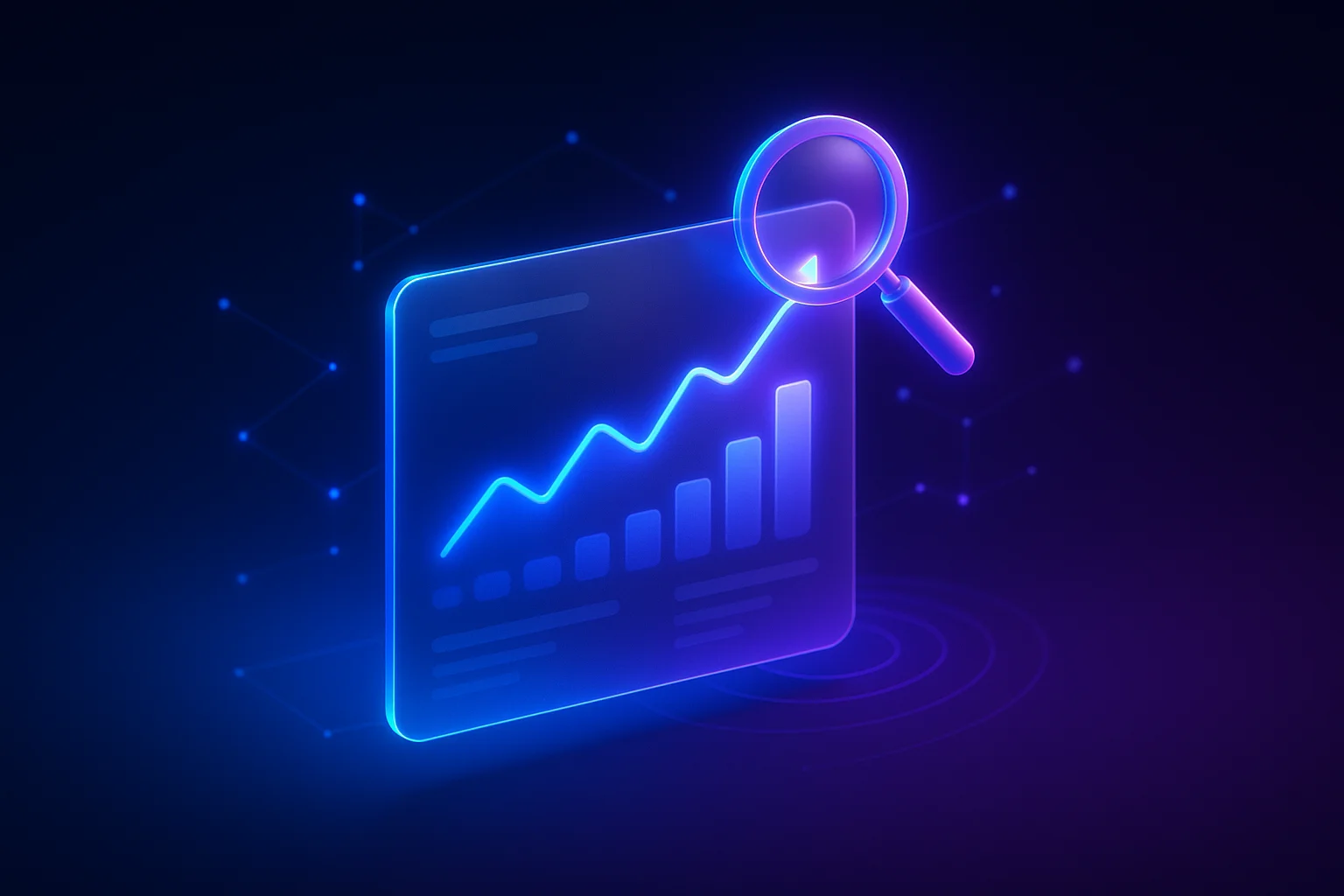
Most businesses find out something's wrong when a customer complains, a bank balance looks off, or a month-end report finally gets compiled — days after the problem started. AI Insights exists to close that gap: it sits above every other module and turns the live data already flowing through Finance, HR, CRM, and inventory into one dashboard, instead of waiting for someone to build a report about it.
The cross-module executive dashboard pulls numbers straight from wherever they were created — an invoice from Finance, an attendance record from HR, a deal stage from CRM — so it's never stale. Anomaly & reorder alerts run continuous checks against that same data (a stock level crossing its threshold, an expense spiking outside its usual range, attendance patterns that don't add up) and notify the right person automatically. Automated report summaries turn raw tables into a plain-language weekly recap, predictive trend forecasting projects revenue and inventory needs from historical patterns, and Location Intelligence layers the GPS and geofence data already captured in People & HR onto a map for route and territory decisions. The AI Intelligence engine behind all of it — 3,000,000 tokens included per month — is also what powers natural-language questions across your own data, so someone can just ask instead of building a filter.
The result isn't a prettier chart — it's less time spent assembling reports and more time spent acting on what they already say.
The system tells you what's wrong before your team has to ask.
What's included in AI Insights
- Cross-module executive dashboard
- Anomaly & reorder alerts
- Automated report summaries
- Predictive trend forecasting
- Location Intelligence & geo-analytics
- AI Intelligence engine (3,000,000 tokens/month)
People & HR
A typical small or mid-size business runs HR across three or four disconnected tools — an ATS for hiring, a separate app for attendance, a spreadsheet for payroll, and a filing cabinet (physical or digital) for contracts and policy sign-offs. Every new hire means re-entering the same person's details into each one. People & HR replaces that stack with a single employee record that follows someone from application to payslip.
Recruitment & candidate tracking manages the pipeline from application to offer, and structured onboarding gets a new hire their accounts, documents, and first tasks set up before day one instead of during it. GPS-verified and biometric attendance (covering up to 50 tracked devices on the Growth plan) confirms who was actually on site rather than relying on a self-reported time sheet, and payroll runs straight off those verified hours to generate payslips without a manual reconciliation step. Leave & holiday scheduling keeps managers, calendars, and coverage in sync, performance reviews & OKRs tie review cycles back to the same employee record instead of a separate form, and the policy center keeps every acknowledged policy and signed document in one auditable place. An employee self-service portal lets staff check their own leave balance or download a payslip without opening a ticket with HR.
Because every one of those pieces reads and writes the same employee record, disputes over hours, pay, or leave balances stop being a game of finding the right spreadsheet — the answer is already there.
From application to payslip, every HR record lives in the same system — nothing re-typed twice.
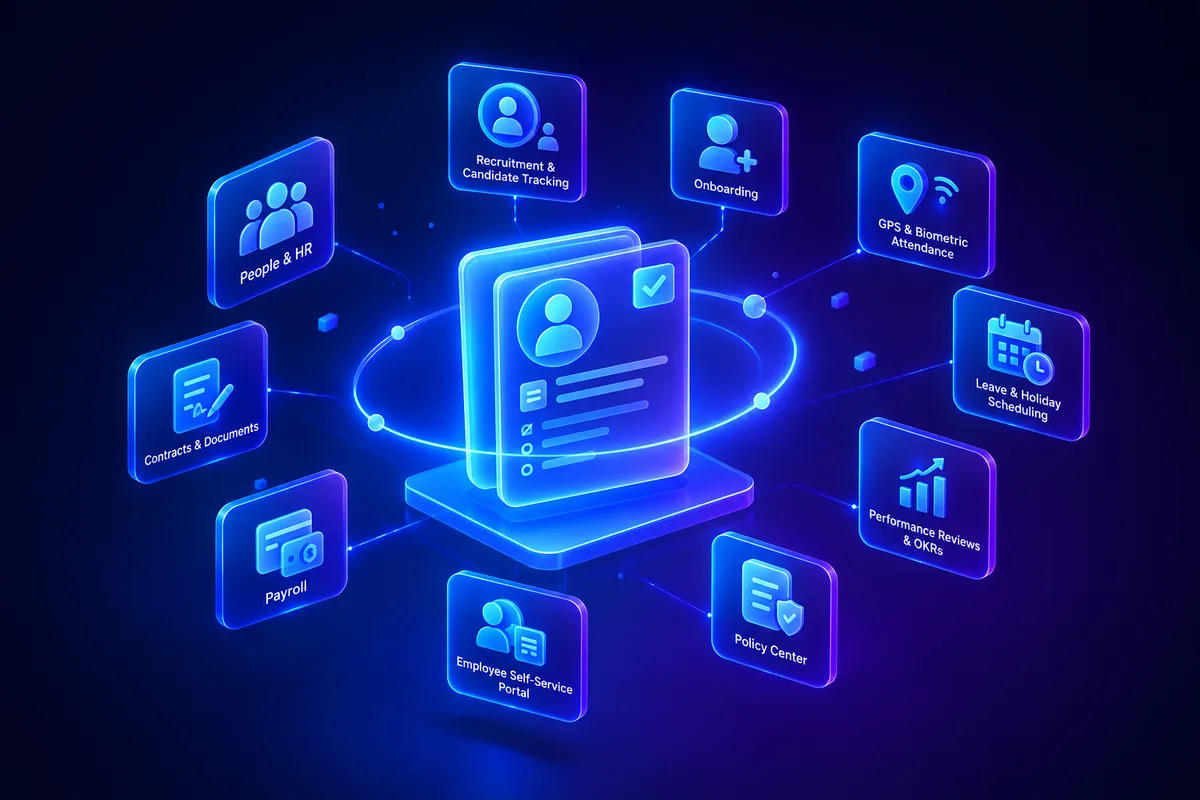
What's included in People & HR
- Employee database & documents
- GPS-verified attendance (up to 50 tracked devices)
- Biometric attendance
- Payroll & payslips
- Leave & holiday scheduling
- Recruitment & candidate tracking
- Structured onboarding
- Performance reviews & OKRs
- Employee self-service portal
- Policy center
Location Intelligence
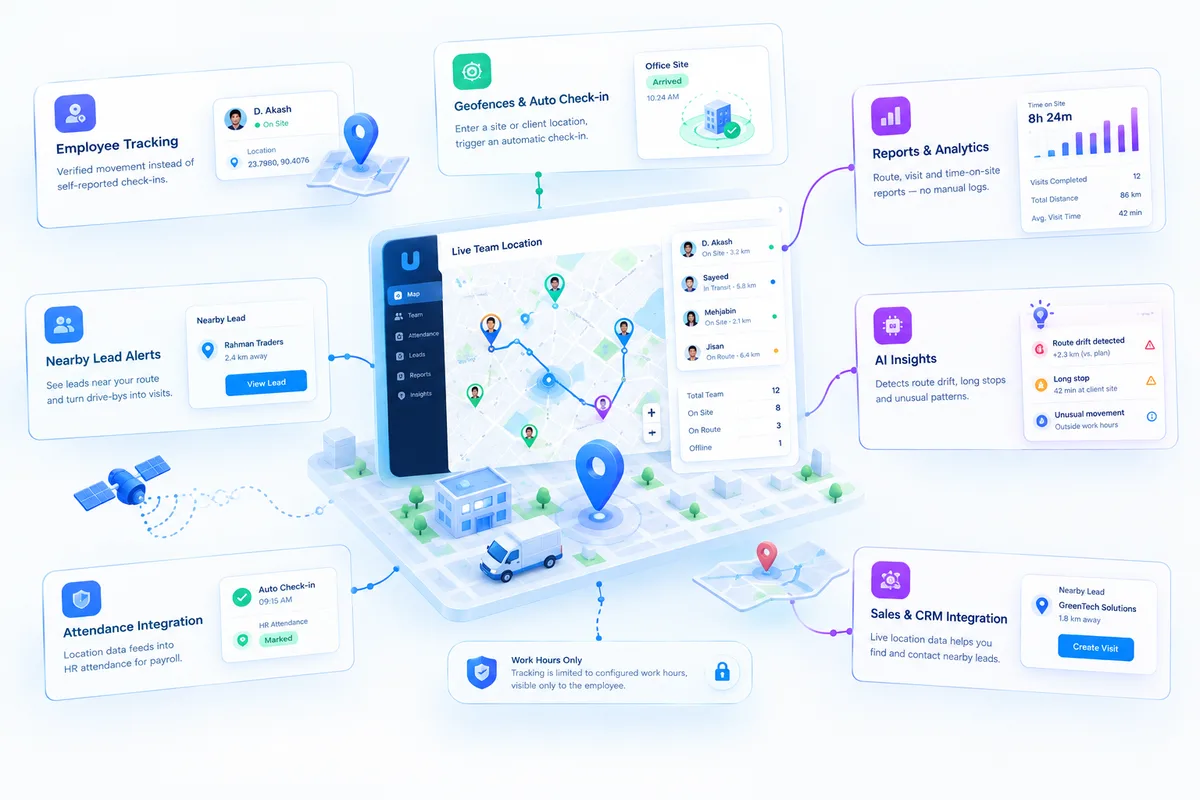
Once someone leaves the office, most businesses lose all visibility into where they actually are — a field rep, technician, or delivery driver becomes a name on a schedule until they're back and self-report what happened. Location Intelligence puts every team member's location live on one map, and that data doesn't sit in a separate tracking app — it feeds straight into the same Attendance and Leads records the rest of SigmaTurn already uses.
Employee tracking captures verified movement instead of a self-reported check-in, and geofences set per site, client location, or region trigger an automatic check-in the moment someone actually arrives — feeding straight into the HR Attendance module for payroll, with nobody tapping a button. Reports turn that raw GPS trail into route and time-on-site reports without a manual log, and nearby-lead alerts cross-reference a rep's live route against the Sales & CRM pipeline to surface a lead worth visiting while they're already close by, turning a potential drive-by into an actual visit. An AI Insights layer watches for patterns across all of it automatically — route drift, unusually long stops — and flags them without anyone reviewing a route by hand.
None of this runs unscoped in the background: tracking is limited to configured work hours, and it's visible to the employee it belongs to. This isn't surveillance outside the job — it's proof the job happened where and when it was supposed to.
Attendance nobody has to take your word for — because the map already proved it.
What's included in Location Intelligence
- Live team location on one map
- Verified employee tracking (not self-reported)
- Geofenced automatic check-in
- Route & time-on-site reports
- Nearby-lead alerts tied to Sales & CRM
- AI-flagged route & stop-time anomalies
- Work-hours-scoped tracking with employee visibility
Sales & CRM
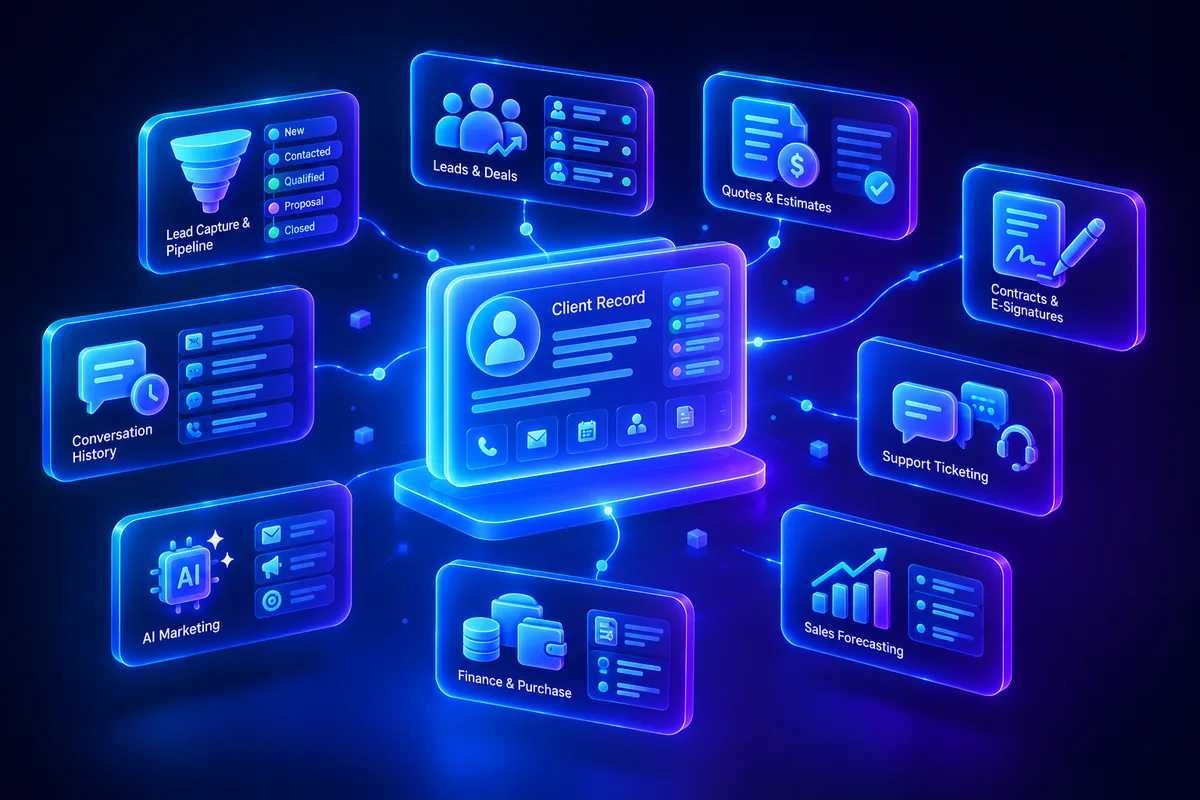
Leads die in inboxes. A prospect emails, someone forwards it to the wrong person, a follow-up never gets scheduled, and three months later nobody remembers the conversation happened. Sales & CRM exists to make that structurally harder — every lead, quote, and conversation is tied to one client record instead of scattered across whoever last touched it.
Lead capture & pipelines pull in leads from web forms and marketing campaigns automatically and track them through defined stages instead of a mental to-do list. Quotes & estimates generate branded documents in minutes from the same product catalog used in Finance, and contracts move to close with built-in e-signatures — no printing, scanning, or chasing a signed PDF over email. Support ticketing keeps post-sale issues attached to the same client record the sale was made on, so a support agent isn't starting from zero, and sales forecasting projects revenue from real pipeline stages and probabilities rather than a gut-feel number in a board meeting.
Because Sales & CRM shares its client and lead data with AI Marketing and Finance & Purchase, a lead captured by a campaign, quoted, invoiced, and supported never has to be re-explained by the customer at any step along the way.
Every lead, quote, contract, and support ticket — tied to one client record for good.
What's included in Sales & CRM
- Lead capture & pipelines
- Client database
- Quotes & estimates
- Contracts & e-signatures
- Support ticketing
- Sales forecasting
POS
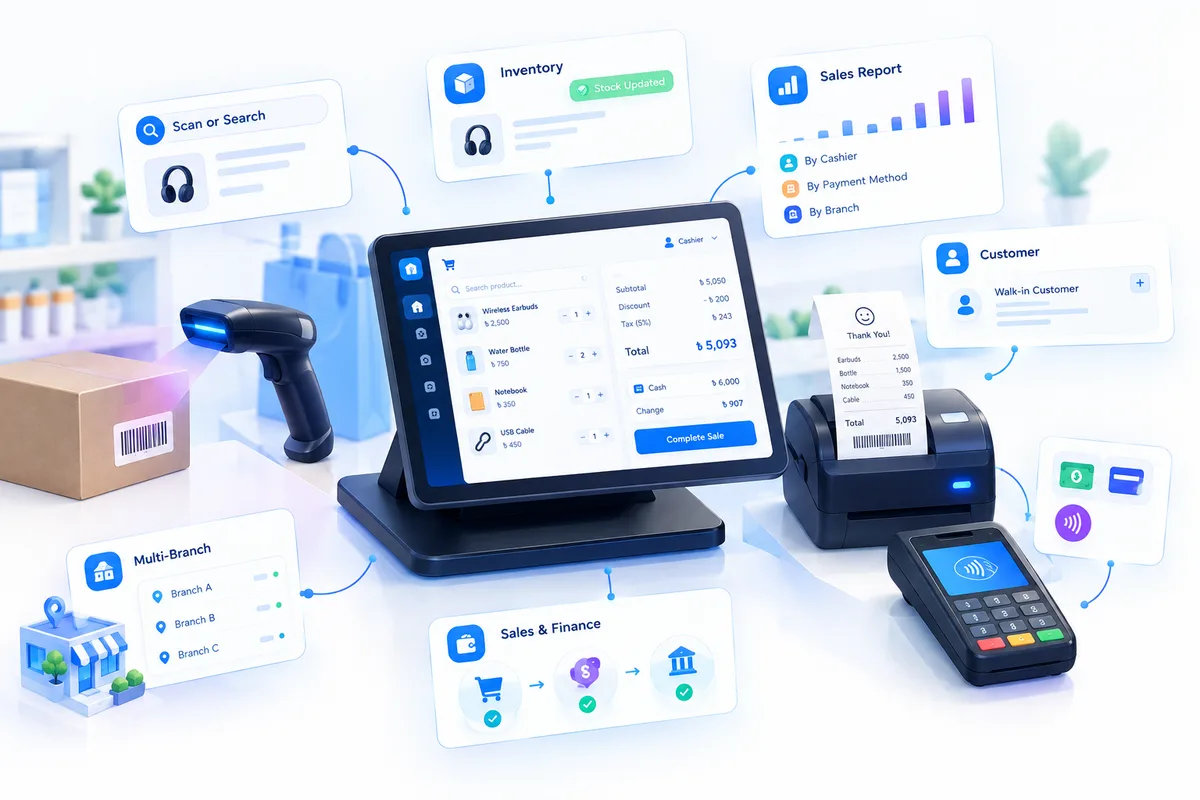
At most counters, the till totals the sale, a calculator works out the change, a notebook tracks what sold, and someone re-types it all into the books at night — so stock and revenue are never quite right until the next morning. SigmaTurn's POS is checkout that scans, sums, and syncs every sale: scan an item and the cart, discount, tax, total, and change are worked out for you, then stock and books update the moment the sale closes.
Scan a barcode — or search the product list by name when a label won't read — and the item joins the cart at its set price; scan it again and the quantity goes up instead of adding a duplicate line. Subtotal, discount, tax, and the grand total recalculate on every change, discounts can be a flat amount or a percentage on a single item or the whole bill, and once the cashier enters the amount tendered in cash or card, the change due is shown instantly — nobody reaches for a calculator. A printed receipt is ready the moment the sale is complete, and daily sales reports break the day down by cashier, payment method, and branch.
Closing a sale deducts the sold quantities from stock straight away, so the count on screen matches the shelf with no end-of-day adjustment, and the sale and its payment land in Finance with the rest of your revenue instead of a till report someone has to re-enter. Attach a sale to a client and it shows up in their history next to their orders, deals, and support tickets. Because the same product list powers Purchase and Inventory, a price updated once is the price every register charges — and with Branch Management, each branch runs its own register with its own sales and stock while head office sees them all. Whether it's a shop, a restaurant or café counter, or a multi-branch business, it's one checkout that talks to your books instead of a separate till system that doesn't.
Scan it, sell it, and the stock count and the books are already right — before the customer walks out the door.
What's included in POS
- Barcode scanning & product search
- Automatic subtotal, discount, tax & total
- Flat or percentage discounts, per item or per bill
- Cash & card payments with change due
- Printed receipts
- Live stock deduction on every sale
- Sales attached to the customer's client history
- Daily sales reports by cashier, payment method & branch
- Branch-scoped registers with a head-office view
Website Scanner
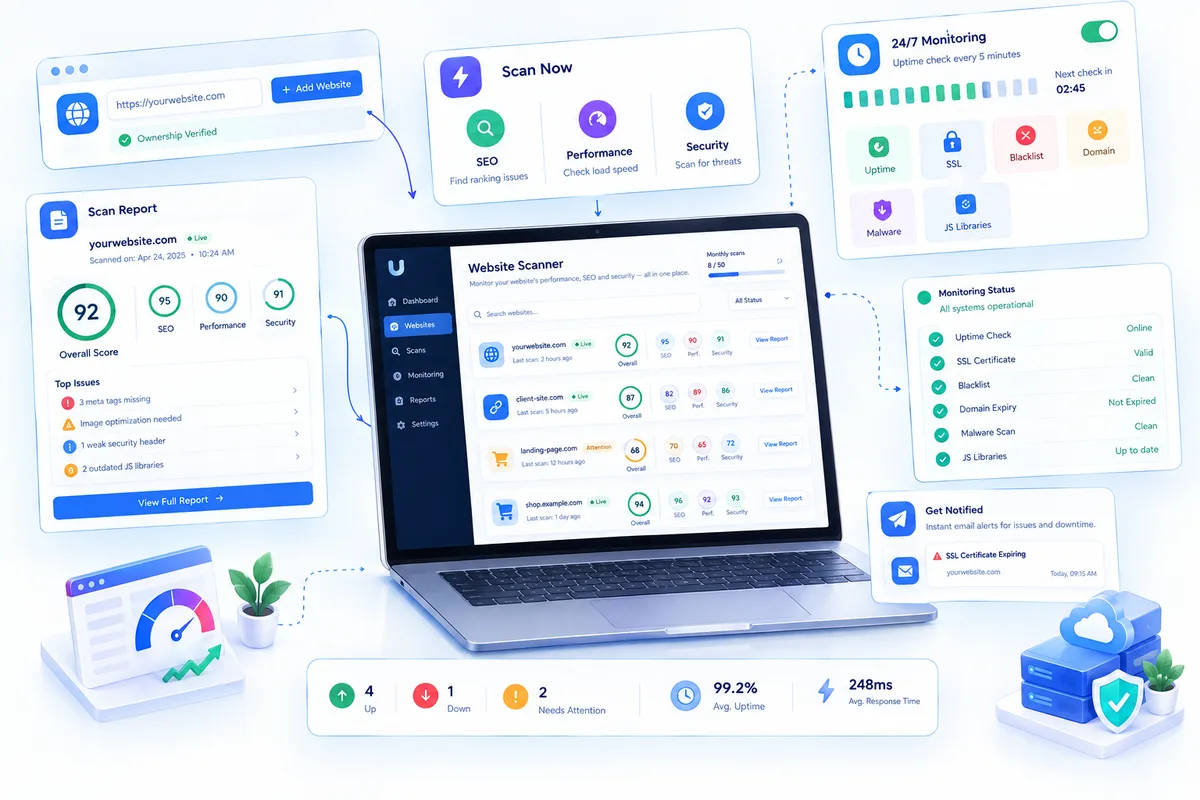
For most businesses, the website is the one system nobody is actually watching. The site goes down on a Saturday, the SSL certificate quietly expires, or the domain lapses — and you find out from a customer. SEO and speed audits, meanwhile, live in three different free tools that nobody remembers to run. SigmaTurn's Website Scanner puts all of it in one place: scan any site you own for SEO, performance, and security in one click, then let 24/7 monitoring watch uptime, SSL, blacklists, and domain expiry — and email you the moment something needs attention.
Add a website with its URL and an optional label, confirm you own it or have the owner's permission, and it's ready to scan. Scan Now runs SEO, performance, and security checks together — the on-page issues holding your rankings back, how fast your pages load and what's slowing them down, and security headers, outdated JavaScript libraries, and malware. The scan runs in the background and the report page updates by itself, then shows an overall score alongside separate SEO, performance, and security scores and the issues behind each one. Every scan records who ran it and when, so the whole team sees the latest result, and your monthly scan allowance is always shown above the list.
Switch on 24/7 Monitoring for a site and uptime is checked every 5 minutes, day and night, with a countdown to the next check and a bar for each hour of the last 24. Once a day it also checks security, the SSL certificate, the Google blacklist, domain expiry, malware, and outdated JavaScript libraries — each shown as its own status tile — and an email goes out the moment a site goes down or a check needs attention, so a certificate or domain gets renewed before it runs out instead of after. The overview counts how many sites are up, down right now, or need attention, alongside average uptime and response time over the last 30 days. For a business owner that's peace of mind without hiring someone to watch the site; for a marketing team it's SEO and speed checks next to the campaigns and landing pages that depend on them, in the same platform; and for agencies and IT teams it's several client sites monitored from one list — and hearing about a problem before the client calls.
Your website gets checked every 5 minutes — so the first to notice a problem is you, not your customer.
What's included in Website Scanner
- One-click SEO, performance & security scans
- Overall score with SEO, performance & security breakdowns
- On-page SEO issue detection
- Page load speed & bottleneck analysis
- Security headers, outdated JavaScript libraries & malware checks
- 24/7 uptime monitoring every 5 minutes
- Daily SSL, domain expiry & Google blacklist checks
- Email alerts the moment a site goes down or a check fails
- 30-day average uptime & response time overview
- Multiple sites in one list, with who-scanned-when history
Work & Projects
Coordinating a team's work usually means picking between too little structure (a shared chat thread) and too much (a project tool nobody outside engineering opens). Work & Projects aims for the middle: enough structure to see where things stand, without becoming its own separate app your other modules don't talk to.
Projects & milestones give a timeline view of where each initiative stands, and kanban & task boards handle the day-to-day execution underneath them. Timesheets & capacity planning show who's overloaded and who has room to take on more, before a deadline makes that obvious the hard way. Event scheduling keeps meetings and deadlines visible company-wide rather than buried in individual calendars, asset management tracks equipment assigned to a project or person, and QR code generation makes physical asset tagging and check-in a scan instead of a spreadsheet lookup. The official letters module generates and tracks formal company correspondence, and a server & infrastructure manager gives technical teams a place to track the systems a project actually depends on, alongside the project itself instead of in a separate ops tool.
A manager checking on progress isn't asking for a status update in chat — the board, the timesheet, and the timeline already have the answer.
Every project, task, and asset tracked in the same place your team already works.
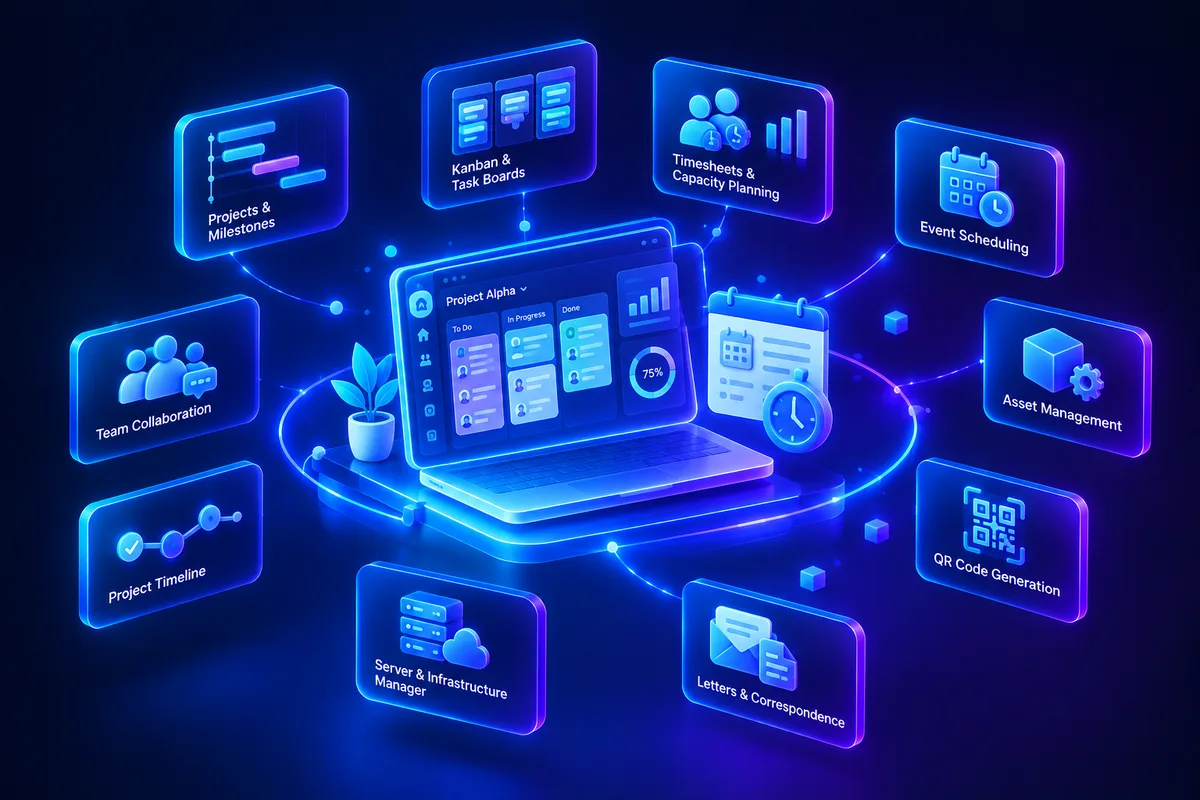
What's included in Work & Projects
- Projects & milestones
- Kanban & task boards
- Timesheets & capacity planning
- Event scheduling
- Asset management
- Knowledge base
- QR code generation
- Official letters
- Server & infrastructure manager
Finance & Purchase
Finance is usually the department paying the highest tax for disconnected tools — invoices in one app, expenses in a spreadsheet, purchase orders over email, and a bookkeeper re-entering all of it into accounting software at month end. Finance & Purchase removes the re-entry step by putting invoicing, spending, purchasing, and the ledger on the same data model to begin with.
Invoicing & online payments let you bill a client and collect payment without leaving the platform, and expense tracking captures spend as it happens instead of at month-end reconstruction. Purchase orders formalize buying from vendors, and vendor & bank account management keeps supplier details and banking information centralized rather than in someone's personal notes. Because every invoice, expense, and purchase order already lives in the same system, the full accounting ledger reconciles against them automatically instead of requiring a separate import, and product catalog & order management ties sales orders straight through to inventory and invoicing.
The practical result: closing the books stops being a multi-day exercise in matching records across five tools, because there was only ever one system recording them.
Every invoice, expense, and purchase order reconciles itself — because it was never a separate system to begin with.
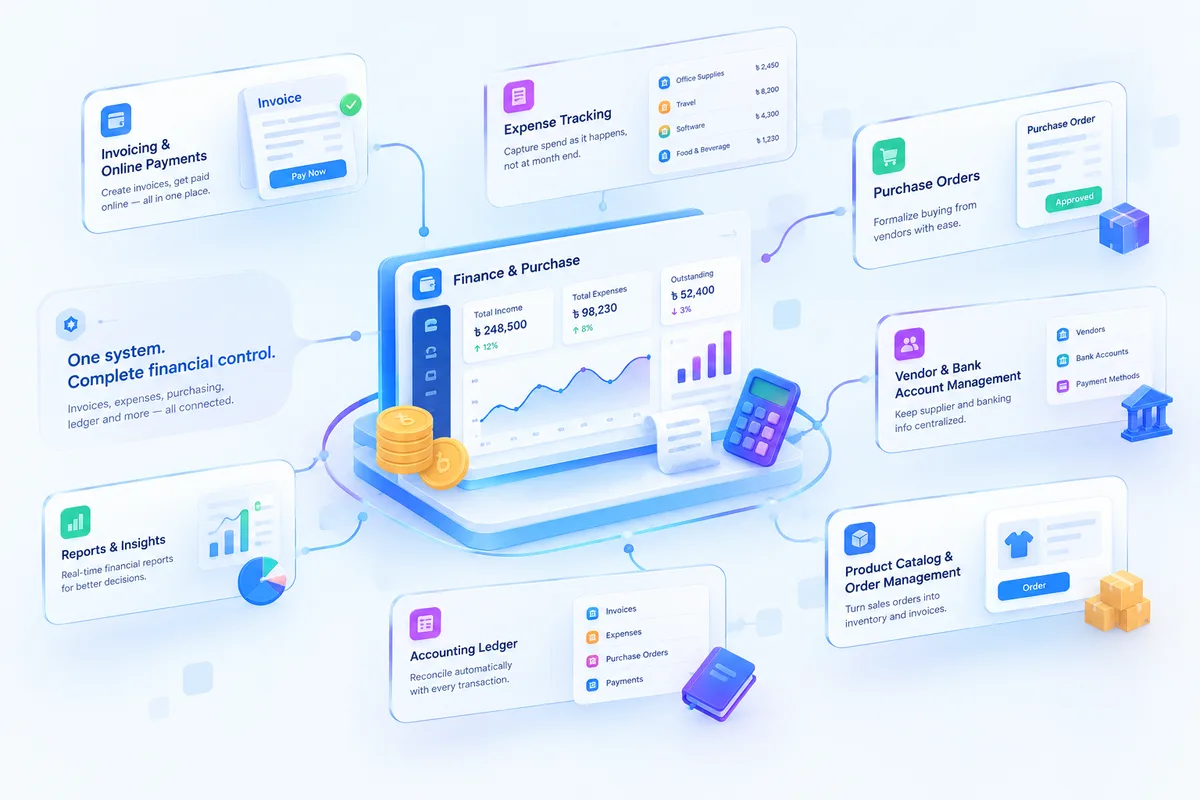
What's included in Finance & Purchase
- Invoicing & online payments
- Expense tracking
- Purchase orders
- Vendor & bank account management
- Full accounting ledger
- Product catalog & order management
Communication
Internal conversation about work tends to happen everywhere except the system that holds the work: a WhatsApp group for the team, personal SMS for client updates, email for anything formal. Communication brings that back inside the platform, so a conversation stays attached to the record it's actually about.
Internal & group messaging cover team-wide and topic-specific threads, and company notices & announcements broadcast updates to everyone or a specific department without a mass email chain. The AI auto-reply bot handles first-touch replies to routine questions automatically — up to 5,000 bot replies included per month — so simple questions get answered instantly instead of waiting in a queue. Zoom meeting integration launches a call directly from a task, project, or client record instead of hunting for a link, webhooks & app integrations push events out to the other tools your team already uses, and transactional SMS sends automated confirmations and reminders — an appointment, an invoice, a delivery — tied to whatever record triggered them.
None of this replaces a dedicated chat app for casual conversation — it replaces the parts of communication that are actually business records, and keeps them next to the data they're about.
Every conversation happens next to the record it's actually about.
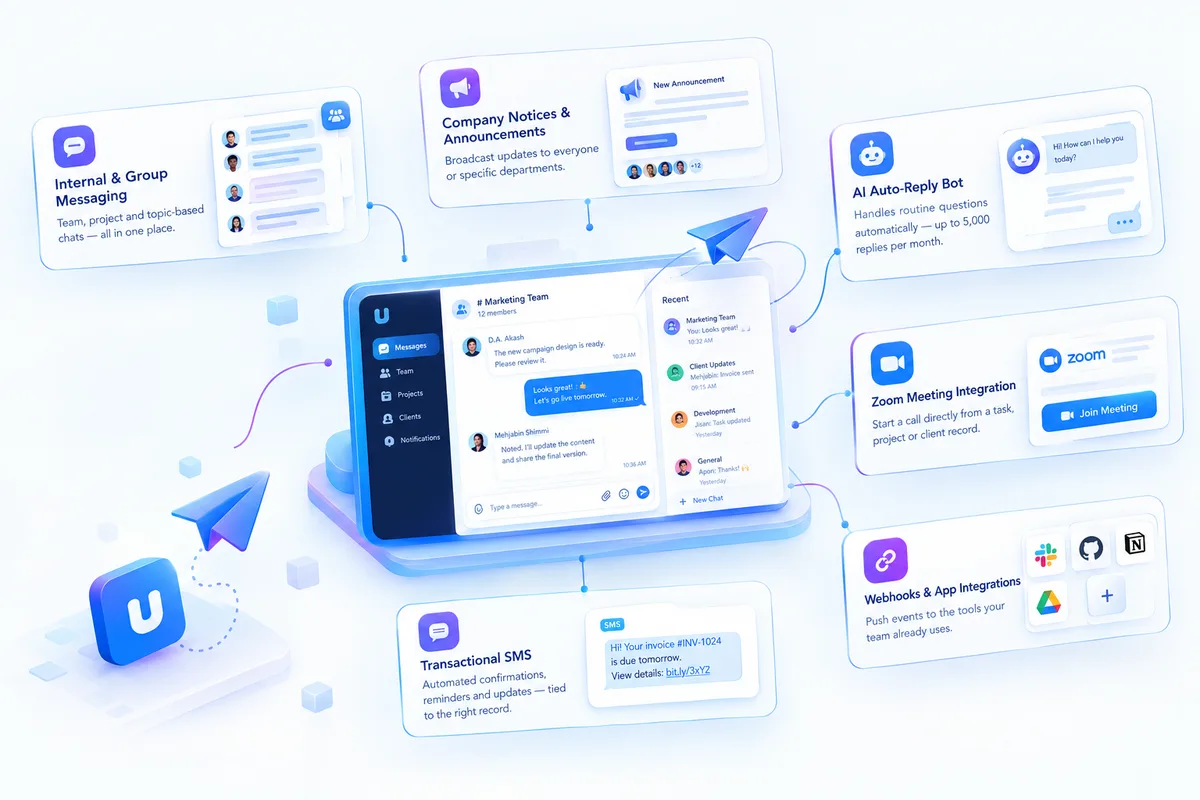
What's included in Communication
- Internal & group messaging
- Company notices & announcements
- AI auto-reply bot (5,000 replies/month)
- Zoom meeting integration
- Webhooks & app integrations
- Transactional SMS
Personal
Not everything an employee needs to track is a company asset — some of it is just their own day. Personal gives each user a private corner of SigmaTurn for the parts of work that don't belong on a shared board but still need somewhere better than a paper notepad.
A personal task list stays separate from project and kanban boards, for the small to-dos that don't need a manager's visibility. Calendar & reminders sync automatically with company events, approved leave, and holidays from People & HR, so a personal schedule never drifts out of step with the official one. Notes give a quick place to capture something mid-call or mid-meeting, and focus-time tracking lets someone block out deep-work windows that are visible to teammates, so a blocked calendar actually gets respected instead of double-booked.
It's a small module compared to the other seven, but it's often the reason someone opens the platform on a day nothing else required them to — and that habit is what makes the rest of the system get used consistently.
A system employees open because it's useful to them, not just because HR makes them.
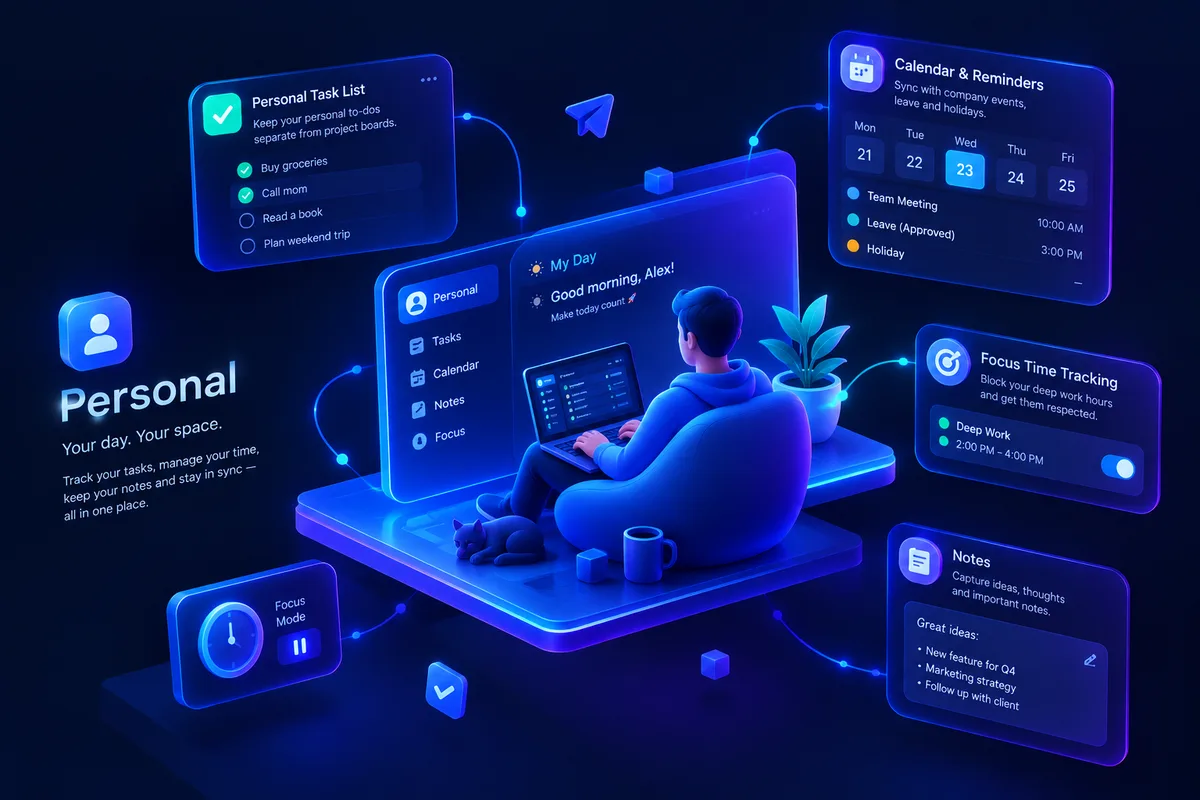
What's included in Personal
- Personal task list
- Calendar & reminders
- Notes
- Focus-time tracking
Branch Management
A second location usually means a second spreadsheet, a second login, or a manager who can see every other branch's numbers along with their own — and none of that holds up past two or three sites. Branch Management adds every location to the same SigmaTurn account instead of spinning up a separate copy of the system per branch, so a business with two branches or twenty runs on one account, one login, and one company-wide report.
Branch managers get put in charge of exactly one branch, and branch-level permissions — set per module, in any role — scope what they can see to that branch instead of the whole company. Assign a manager to Branch B and they only ever see Branch B's employees, clients, invoices, and expenses, in every list screen, search result, and dropdown across the system; Branch A's clients simply don't show up in Branch B's picker. Staff can be assigned to one branch or several, stock is counted per branch — including from the Android app's barcode scanner, syncing once a phone reconnects — with transfers tracked from one branch to another, support ticket queues can be owned by a branch or kept company-wide, and a single job posting can be listed at more than one branch at once. Admins and any role left on "All" keep the unfiltered view across every branch, so head office reviews everything without switching accounts.
It spans the modules a multi-branch business already touches — Employees, Attendance, Leave, Payroll, Clients, Deals, Orders, Tickets, Estimates & Invoices, Expenses, Vendors & Bills, Inventory & Transfers, Contracts, and Assets — on web and in the Android app alike. And for a company with only one location, none of it gets in the way: no extra fields, no extra setup, nothing changes until a second branch actually opens.
Two branches or twenty — one account, one login, and a head office view that never has to ask a manager for their numbers.
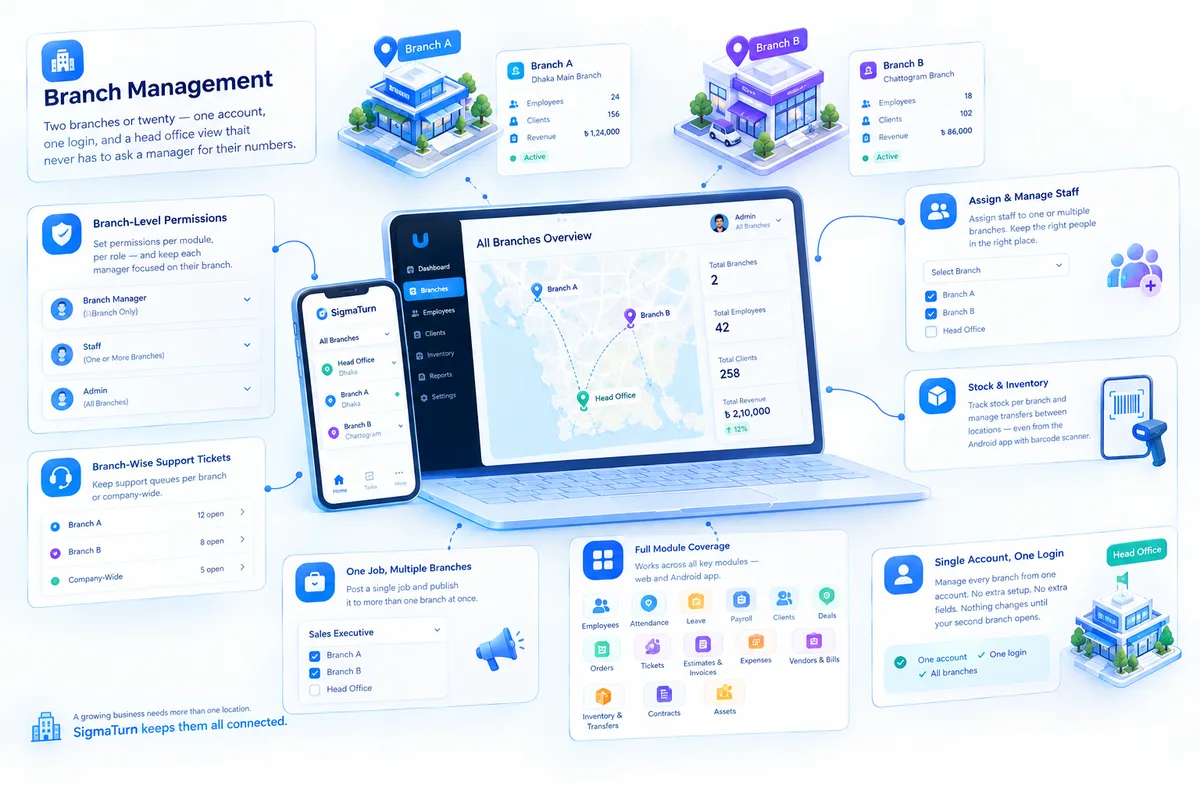
What's included in Branch Management
- Unlimited branches on one company account
- Branch managers scoped to their own branch
- Branch-level permissions, module by module
- Staff assigned to one branch or several
- Branch stock counts & inter-branch transfers
- Branch-owned or company-wide ticket queues
- Multi-branch job postings
- Company-wide reporting for head office
Every feature, listed. Nothing hidden behind a demo call.
The complete SigmaTurn feature set — every module unlocked on the Growth plan, one by one.
- Clients
- Employees
- Projects
- Attendance
- Tasks
- Estimates
- Invoices
- Payments
- Time Logs
- Tickets
- Events
- Notices
- Leaves
- Leads
- Holidays
- Products
- Expenses
- Contracts
- Reports
- Orders
- Knowledge Base
- Bank Account
- Messages
- AI Intelligence
- Assets
- Biolinks
- Biometric
- Group Message
- Letter
- Payroll
- Performance
- Policy Center
- Purchase
- QR Code
- Recruit
- Server Manager
- SMS
- Webhooks
- Onboarding
- Zoom
- Front Website
- Lead Collection
- Location Intelligence
- Smart Marketing
- Accounting
- E-Signature
- AI Auto-Reply Bot
- SMS Campaigns
- Email Campaigns
Stop stitching tools together. Run the business from one system.
Every department shares one data model, so nothing falls through the cracks between apps.
One Data Model
Finance, CRM, HR, and inventory all read and write the same records — no more reconciling spreadsheets.
GPS & Workforce Tracking
Real-time location, geofenced attendance, and route history built directly into the HR module.
Business Intelligence, Instantly
Custom report builder and live dashboards replace reports that used to take days to compile.
AI Working in the Background
Anomaly flags, reorder alerts, and automated summaries surface problems before they cost you money.
Enterprise-Grade Security
End-to-end encryption, role-based access, automatic backups, and GDPR compliance as standard.
Modules Grow With You
Start with two modules and add more anytime — existing data stays connected, no migration required.
One platform, however your business is shaped.
SigmaTurn scales across company size, business model, and industry:
- Startups (1–20 employees) replacing spreadsheets with one system
- Growing SMEs (20–100 employees) consolidating disconnected tools
- Enterprises (100–500+ employees) needing custom modules and SLAs
- B2B, B2C, D2C, and B2B2C business models
- Service businesses, product-based businesses, and hybrids
- Subscription and SaaS businesses tracking recurring revenue
- Retail, restaurants, and hospitality operators
- Manufacturing, pharmacy, and logistics companies
- Professional services firms managing clients and delivery
Whatever the shape of your business, SigmaTurn adapts its modules to fit — not the other way around.
Trusted by fast-growing companies around the world.
23+ businesses across e-commerce, education, real estate, and more have shipped with us.
 14ER
14ER Expert Glazing London
 Avroxy
 array
array Omniverce
 NCIEF
NCIEF BOUNZ
BOUNZ Passionate Bangladesh14ERExpert Glazing LondonAvroxyarrayOmniverceNCIEFBOUNZPassionate Bangladesh
 BookManAndVan
 Basumati
 jatiyonews.com
 Tiger Music
 Microbial Systems
 Basumati Construction
 Celavive
 Muslim PointBookManAndVanBasumatijatiyonews.comTiger MusicMicrobial SystemsBasumati ConstructionCelaviveMuslim Point
 SohoWizz
 BTCS
BTCS Trivoshop
 UniGrad
 Kingsgate College
 Metro MartSohoWizzBTCSTrivoshopUniGradKingsgate CollegeMetro Mart
Questions About SigmaTurn
Yes. Modules can be added at any time, and your existing data stays connected across every module you add.
Guided import from spreadsheets or your existing tools, with field mapping handled by our onboarding team.
End-to-end encryption, role-based access control, automatic backups, and GDPR compliance are built in at every plan level.
The 7-day trial runs on the Growth or Professional plan with no credit card required — you choose whether to continue on a paid plan afterward.
SigmaTurn ships pre-configured workflows for retail, restaurants, manufacturing, pharmacy, logistics, and professional services, and can be customized further on Enterprise.
Ready to Transform Your Business?
Go Digital, Automate, and Scale with GiveTurn
Take your business to the next level with GiveTurn's AI-Powered Business Transformation. Whether you're a small shop, a startup, a growing company, or a large enterprise, we provide end-to-end digital solutions that help you automate operations, enhance customer experience, and scale efficiently. Our services include professional website and app development, AI-driven business automation, ERP and CRM systems, branding, content creation, digital marketing, SEO, social media management, graphics, video production, security, analytics, and more.
- Free consultation
- Reply within 24 hours
- No obligation, ever